Programmes

What your child will actually do

Parents are not buying coding, robotics or design. They are buying confidence, problem-solving, creativity, future-readiness, and a productive use of their child's time. Every course below answers three questions: why does my child need this, what will they actually do, and how will I know they learned something valuable?

Before you register

Each pathway is activated once its minimum enrolment is reached:

5 learners

Foundations · Coding · Robotics · Engineering Design Thinking

8 learners

Competition Pathway

You can register your preferred pathway at any time. We'll confirm once the minimum enrolment is reached and the track is activated.

Ages 3–5 · Foundations

One track, changing each term
Term 1 · Sept–Dec

Maths Whizz

Why do some children grow up loving numbers while others become afraid of them? The answer often lies in their first experience with mathematics. Maths Whizz helps young learners discover that maths is not about memorising answers. It's about exploring patterns, solving puzzles, and making sense of the world around them. Through hands-on games, stories, movement activities, counting challenges, and interactive play, children develop strong early numeracy skills while building confidence and curiosity. Every lesson turns abstract concepts into exciting adventures little minds can see, touch, and understand. By the end of the term, learners won't just recognise numbers. They'll begin thinking like young mathematicians.

What your child needs
  • Ages 3–5
  • No prior maths experience required
  • Comfortable clothing for movement-based activities
Learning outcomes
  • Recognise and identify numbers confidently
  • Count objects accurately
  • Understand simple patterns and sequences
  • Compare quantities (more, less, equal)
  • Develop problem-solving and reasoning skills
  • Build confidence working with numbers
How we measure progress
  • Number recognition assessment
  • Counting accuracy activities
  • Pattern identification exercises
  • Problem-solving observation checklist
  • Parent progress report at term end
Term 2 · Jan–Mar

Robotics (BricksBot)

What if your child's first robot became the moment they realised they could build anything they imagine? BricksBot introduces young learners to engineering and robotics through age-appropriate building challenges. Children explore how machines move, how simple mechanisms work, and how ideas become real creations. Using colourful building kits, learners design, build, test, and improve their own robotic models while developing creativity, perseverance, and teamwork. Every session encourages exploration and celebrates curiosity. Most importantly, children learn that mistakes are not failures. They're part of the invention process.

What your child needs
  • Ages 3–5
  • No previous robotics experience required
Learning outcomes
  • Build simple robotic models
  • Understand basic mechanical concepts
  • Improve fine motor skills
  • Practise following instructions
  • Develop creativity and imagination
  • Build confidence through hands-on making
How we measure progress
  • Completion of weekly build projects
  • Observation of engineering thinking skills
  • Collaboration and participation assessment
  • End-of-term robotics showcase
Term 3 · May–June

Non-Screen Coding

Can children learn coding before they can type? Absolutely. Non-Screen Coding introduces computational thinking without computers. Through games, storytelling, movement, puzzles, and hands-on activities, children learn the same logical thinking skills that programmers use every day. Learners discover how to follow sequences, identify patterns, solve problems step-by-step, and give instructions to achieve a goal. These foundational skills support future success in coding, mathematics, science, and everyday problem-solving. It's coding made playful, meaningful, and age-appropriate.

What your child needs
  • Ages 3–5
  • No technology required
Learning outcomes
  • Understand sequencing and order
  • Follow and create simple instructions
  • Develop logical thinking skills
  • Practise problem-solving strategies
  • Build confidence in independent thinking
How we measure progress
  • Completion of coding games and challenges
  • Sequencing assessments
  • Problem-solving observation records
  • End-of-term showcase activities
Ages 6–9

Choose one track for the whole year

You pick either Coding or Robotics, not both.

Your child stays on that track across all three terms, so each term builds on the last. You'll make this choice on the registration form.

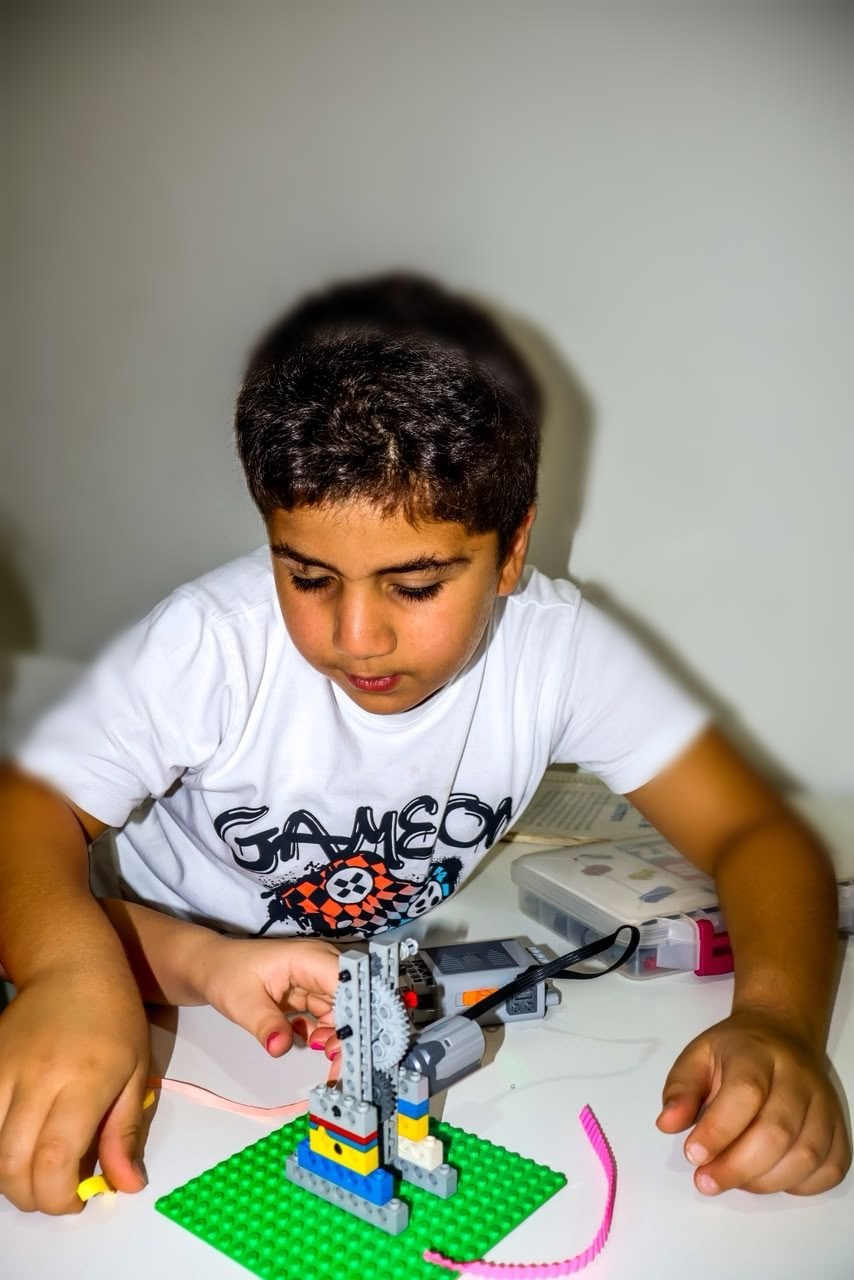
A learner concentrating as he builds a motorised LEGO crane

Coding Track

Python, game development, computer science
Term 1 · Sept–Dec

Ozaria — Introduction to Computer Science with Python

Ozaria is a story-driven coding platform where children learn real Python programming by solving challenges and progressing through an interactive adventure. Every app, game, and website your child uses was created by someone who learned to code. In this introduction to computer science, learners become heroes in an interactive adventure where they solve challenges using real programming concepts. Through the Ozaria platform, students learn Python, the world's most widely used beginner-friendly programming language. Rather than memorising commands, learners develop critical thinking as they solve puzzles, overcome obstacles, and create solutions through code. By the end of the term, students won't just play technology. They'll begin creating it.

What your child needs
  • Laptop (Windows or MacBook)
  • Active Gmail account accessible by the learner
  • Basic keyboard and mouse skills
Learning outcomes
  • Understand core coding concepts
  • Write simple Python programs
  • Use variables, loops, and commands
  • Develop logical thinking
  • Build confidence solving coding challenges
How we measure progress
  • Progress through Ozaria learning levels
  • Coding challenge completion rate
  • Instructor project assessment
  • End-of-term coding portfolio
Term 2 · Jan–Mar

CodeCombat — Computer Science 1 & Game Development 1

CodeCombat is a game-based coding platform where children write real code to control characters, solve challenges, and build game experiences. Imagine your child learning programming by building and controlling game characters. In this action-packed course, learners move beyond coding basics and begin creating solutions inside a game-based environment. Students use programming concepts to navigate challenges, defeat obstacles, and design game mechanics. Every level strengthens computational thinking while making learning engaging and rewarding. This is where coding starts feeling like a superpower.

What your child needs
  • Laptop (Windows or MacBook)
  • Active Gmail account
Learning outcomes
  • Apply programming concepts independently
  • Use functions and loops effectively
  • Solve increasingly complex coding problems
  • Understand basic game mechanics
  • Improve analytical thinking
How we measure progress
  • Level completion rate
  • Coding accuracy assessments
  • Independent problem-solving tasks
  • Instructor project review
Term 3 · May–June

CodeCombat — Computer Science 2 & Game Design 2

The best way to understand technology is to create it. In this advanced course, learners take on more sophisticated coding challenges while exploring the principles behind game design. Students learn how programmers think, test ideas, debug errors, and create engaging digital experiences. By the end of the term, learners will have the confidence to tackle larger coding projects and continue their journey as young creators.

What your child needs
  • Successful completion of previous terms or equivalent experience
  • Laptop (Windows or MacBook)
Learning outcomes
  • Build more advanced coding projects
  • Strengthen debugging skills
  • Design and improve game experiences
  • Apply structured problem-solving methods
  • Demonstrate coding independence
How we measure progress
  • Project completion
  • Coding portfolio review
  • Debugging challenge performance
  • Final showcase presentation

Robotics Track

Engineering, invention, climate science
Term 1 · Sept–Dec

Bricks4Kidz Engineering Challenge

What if your child could think like an engineer? Using hands-on building projects inspired by real-world machines and inventions, learners discover how engineering shapes the world around them. Each week, students tackle exciting design challenges that strengthen creativity, teamwork, and critical thinking. Through building, testing, and improving models, children learn that innovation begins with curiosity.

What your child needs
  • No prior robotics experience required
Learning outcomes
  • Understand engineering principles
  • Build functional mechanical models
  • Improve problem-solving skills
  • Develop teamwork and communication
How we measure progress
  • Weekly project completion
  • Engineering challenge participation
  • End-of-term showcase
Term 2 · Jan–Mar

Strawbees Creative Engineering

The innovators of tomorrow start by building today. Strawbees empowers learners to transform simple materials into extraordinary creations. Students design structures, inventions, and prototypes while exploring engineering, architecture, and creative problem-solving. This course encourages learners to think beyond instructions and become inventors.

What your child needs
  • Laptop (Windows or MacBook)
  • Curiosity and willingness to create
Learning outcomes
  • Design original solutions
  • Build stable structures
  • Develop creative confidence
  • Apply engineering thinking
How we measure progress
  • Design challenge outcomes
  • Prototype presentations
  • Creativity and collaboration assessment
Term 3 · May–June

Climate Science & Sustainability

The future belongs to children who understand the challenges facing our planet. This engaging programme introduces learners to climate science through experiments, investigations, and hands-on projects. Students explore weather, renewable energy, ecosystems, and sustainability while discovering how science can be used to solve real-world problems. Learners leave not only informed, but empowered to make a difference.

What your child needs
  • No prior science experience required
Learning outcomes
  • Understand key climate concepts
  • Conduct scientific investigations
  • Explore sustainability solutions
  • Build environmental awareness
How we measure progress
  • Science project completion
  • Climate challenge activities
  • End-of-term sustainability presentation
Ages 10–13 · Engineering Design Thinking

Your child won't just learn software. They'll solve a real problem.

Most programmes at this age teach a tool and stop there. This one starts with a problem your child actually cares about (in their home, their school, their street) and treats design, coding and 3D printing as the means to fix it. The technology serves the problem; it is never the destination.

  1. Spot

    Discover problems

    Learners look at their own world properly for the first time: observing, asking questions, and noticing the everyday frustrations most people walk past. They choose one real problem worth solving.

    Outcome: a problem worth their time
  2. Think

    Understand the problem

    Through design thinking and user research, they work out who actually experiences this problem, what those people need, and why it matters. Empathy first, ideas second.

    Outcome: a clear problem statement
  3. Design

    Create the solution

    They learn UI/UX and 3D design principles, then sketch several possible answers before committing to one. Exploring options is the skill: first ideas are rarely the best ones.

    Outcome: sketches, wireframes, a chosen direction
  4. Build

    Bring the idea to life

    Now they pick the right technology for their solution: a digital one becomes an app or interface prototype, a physical one becomes a 3D-designed and 3D-printed product, and a hybrid combines both.

    Outcome: a working prototype
  5. Test

    Learn from real users

    They put the prototype in front of real people, watch what breaks, and listen to feedback that isn't always flattering. Then they improve it. A first prototype is never the final one.

    Outcome: a second, better version
  6. Present

    Tell the story

    They stand up and explain the problem, who it affects, their solution, how they built it, what testing taught them, and the difference it could make. Communicating the work is part of the work.

    Outcome: a portfolio-worthy innovation project

What your child leaves with

Not a certificate saying they can use Tinkercad. A finished innovation project they can show anyone: evidence that they can identify a real problem, think creatively, use digital and physical design tools, build a prototype, take feedback without falling apart, and stand up and explain their thinking.

Creativity, problem-solving, design thinking, technical skill, collaboration and confidence. The software is just where those get practised.

The courses behind the pathway

What they learn, term by term
Term 1 · Sept–Dec

Design Thinking Principles

What if your child could learn to look at everyday problems and think, "There has to be a better way"? Design Thinking introduces learners to the mindset behind great inventions and products. They learn how to identify real-world problems, understand people's needs, brainstorm ideas, test possible solutions, and improve their thinking along the way. Through hands-on challenges, learners develop the creativity, empathy, critical thinking, and problem-solving skills needed to turn problems into possibilities.

What your child needs
  • Laptop (Windows or MacBook)
  • A valid Gmail account that the learner can access independently
  • Basic computer skills
  • Curiosity and willingness to participate in hands-on challenges
Learning outcomes

By the end of the term, learners will be able to:

  • Identify and clearly define real-world problems
  • Understand the needs of different users
  • Generate and compare multiple solution ideas
  • Apply the Design Thinking process to a challenge
  • Communicate and explain their ideas confidently
  • Test, receive feedback, and improve their solutions
How we measure progress
  • Design Thinking challenges and activities
  • Problem identification and research exercises
  • Idea generation and prototyping tasks
  • Learner presentations and peer feedback
  • End-of-term design challenge
Terms 2 & 3 · Jan–June

Product Design: UI/UX & 3D Printing

What if your child's idea could move from a thought in their head to something they can actually see, use, and hold? Building on their Design Thinking foundation, learners explore product design through UI/UX and 3D design. They learn to design digital experiences, create 3D models, develop prototypes, test their ideas, and refine their designs based on feedback. By the end of the pathway, learners will have taken a real-world problem from idea to designed solution, building the confidence to think, create, and innovate.

What your child needs
  • Laptop (Windows or MacBook)
  • A valid Gmail account that the learner can access independently
  • Basic computer skills
  • Completion of Term 1 Design Thinking is recommended
Learning outcomes

By the end of Terms 2 & 3, learners will be able to:

  • Apply Design Thinking to product development
  • Create basic UI/UX designs and interactive prototypes
  • Use Tinkercad to create 3D digital models
  • Understand the basic process of 3D printing
  • Develop and refine prototypes based on feedback
  • Present and explain a product solution confidently
How we measure progress
  • UI/UX design exercises and prototypes
  • 3D modelling projects
  • Prototype development and iteration
  • Instructor feedback and skills assessments
  • Learner portfolio of completed designs
  • End-of-year product design showcase
Competition Pathway · Ages 8–16

Taking talent to the world stage

A focused pathway into international Mathematics and Coding competition. Your child will be guided towards the route that fits them: the International STEM Olympiad (Mathematics, Ages 8–11) or the International Coding Olympiad (Ages 10–16), not both. Eligibility depends on the specific competition. This is where our most driven learners sharpen problem-solving, computational thinking and competition strategy to a standard that can stand up to international judging.

A full year of preparation, with a route forward at every stage. This is not a case of entering an exam and hoping for the best.

  1. Term 1 September – November

    Qualifier preparation

    Build the foundations, then prepare for the first qualification round.

    Sit the November exam
  2. Term 2 January – March

    Finals preparation

    For students who qualify. Deeper problem solving, at the level the finals require.

    Deeper problem solving
    or

    Second attempt

    A further qualification window. Students who need another opportunity can sit again.

    Sit again
  3. Term 3 April – June

    Project & portfolio

    Everyone continues together, building something real to show.

    Build something to show

Every student has somewhere to go in January and April, whether or not they qualify.

Track activation

Minimum 8 learners

Register your interest now. The Competition Pathway will be activated once the minimum of 8 learners is reached.

Where the pathway leads

Two international competitions, run by the Main Team Organization (MTO): one in Mathematics, one in Coding. Your child prepares for one competition, the route chosen for them.

International STEM Olympiad – Mathematics

The Mathematics category of the International STEM Olympiad: problem-solving, logical reasoning and mathematical thinking, examined online.

Eligibility: Ages 8–11.

Organiser's exam fee: €20 per qualification round. The Best of the Best round and online finals are free. Separate from the Saturday Club programme fee below.

International Coding Olympiad

Two coding disciplines: Codementum's coding challenges and CodeCombat's Arena Battles, building real programming and computational-thinking skills.

Eligibility: Ages 10–16.

Organiser's exam fee: €40 per category, per qualification round (Arena Battles or Codementum Challenges). Separate from the Saturday Club programme fee below.

Key dates, 2026–2027

The organiser runs several qualification windows across the year, so a missed date is rarely the only chance. Exact dates from the official 2026–2027 calendar:

2026

  • 31 Oct – 1 NovCoding Olympiad: first qualification window (Codementum Challenges & CodeCombat Arena Battles)
  • 21 NovSTEM Olympiad (Mathematics): first qualification exam
  • 28 NovCoding Olympiad: Computer Science final
  • 19–20 DecCoding Olympiad: second qualification window

2027

  • 30 JanSTEM Olympiad (Mathematics): second qualification exam
  • 13 FebSTEM Olympiad (Mathematics): final exam
  • 20–21 FebCoding Olympiad: third qualification window
  • 6 MarSTEM Olympiad (Mathematics): Best of the Best round
  • 6–7 MarCoding Olympiad: Arena Battles final
  • 14 MarCoding Olympiad: Codementum Challenge final
  • JulyInternational Grand Final: both pathways

Where this leads

Competition preparation is not really about medals. It is about a child learning to hold an idea to a standard, defend it in front of people who will challenge it, and keep going after a setback. Those are the habits that carry into university and beyond.

  • International STEM Olympiad (Mathematics): Ages 8–11. International Coding Olympiad: Ages 10–16. Message us if you're unsure which fits your child.
  • A route at every stage, whether or not your child qualifies first time.
  • Runs alongside the terms, on the same Saturday rhythm.
A proud parent with her son at his university graduation

A STEM METS family at graduation.

Fees

₦400,000 per term. This covers the Saturday Club Competition Pathway programme, and it never rises as your child progresses.

Competition entry fees and international travel costs are separate.

These are not included in the programme fee. Families are responsible for competition entry/exam fees, flights, accommodation, visas and other travel-related costs, where applicable.

You can register for the Competition Pathway on the form: choose it as your child's track. Because the pathway involves qualifying exams and competition deadlines, we always speak to parents afterwards so we can place your child on the right route.
Found the right programme?

Registration takes a few minutes, and you can add siblings in one go.

Register WhatsApp